
This guide covers every feature of logtree, one section each, with a runnable example and its output. Sections are independent – read the first two, then jump to whatever you need.
Each section ends with the reference pages for the functions it used and, where one exists, a link to a complete end-to-end run in the Examples gallery.
The model
logtree has exactly two kinds of line.
A step is a node: a unit of work with a beginning, an end, an outcome, and a duration. It prints an open line when it starts and a close line when it finishes, and anything logged in between is nested underneath it.
A leaf is a message logged against whichever step is currently open. It has a status – debug, info, success, warning, error – but no duration and no children.
That is the whole vocabulary. Depth comes from R’s own call stack rather than from anything you pass: a step opened inside another step is one level deeper, because the function that opened it was called from inside the function that opened the outer one.
logtree_reset()

load_config <- function() {
  log_step("Load config")
  log_info("reading config.yml")
  log_success("validated 12 parameters")
}

pipeline <- function() {
  log_step("Pipeline")
  load_config()
}

pipeline()
#> ▶ Pipeline
#> ├─ ▶ Load config
#> │  ├─ ℹ reading config.yml
#> │  ├─ ✔ validated 12 parameters
#> │  └─ ✔ Done  0.00s
#> └─ ✔ Done  0.01s
load_config() does not know it is being called from
inside a step, and pipeline() does not know that
load_config() logs. Neither passes the other a depth, an
id, or a handle. That independence is the point: instrumented functions
compose without coordinating.
A single line is built from up to six columns, four of them optional:
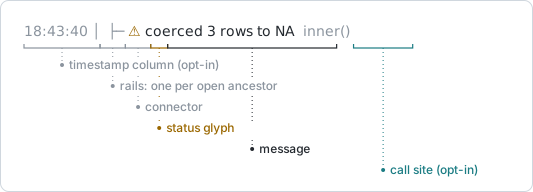
The rails and connector come from depth, the glyph from status, and the three opt-in columns – timestamp, elapsed time, call site – are theme slots covered later on. Every glyph declares its own display width, which is what keeps the message column aligned when you swap themes.
Reference: log_step(),
log_info(), logtree_reset()
Steps that close themselves
log_step() opens a step and registers its close on
the calling function’s frame, not on its own. The close
therefore fires when that function exits – by returning normally, by an
early return(), or because an error unwound through it.
logtree_reset()

validate <- function(rows) {
  log_step("Validate")
  if (rows == 0) {
    log_warn("nothing to validate")
    return(invisible(NULL))       # early return: the step still closes
  }
  log_success("all rows valid")
}

check <- function() {
  log_step("Check")
  validate(0)
  validate(12)
}

check()
#> ▶ Check
#> ├─ ▶ Validate
#> │  ├─ ⚠ nothing to validate
#> │  └─ ⚠ Done  0.00s
#> ├─ ▶ Validate
#> │  ├─ ✔ all rows valid
#> │  └─ ✔ Done  0.00s
#> └─ ✔ Done  0.02s
Both validate() calls closed at the right depth, and the
second one is a sibling of the first rather than a child, even though
the first left through a return() in the middle of its
body. There is no path out of a function that skips the close, which is
what stops indentation from drifting during a long run.
The mechanism is invisible in the output, so it is worth seeing laid out against a run. The bars are how long each frame lives:
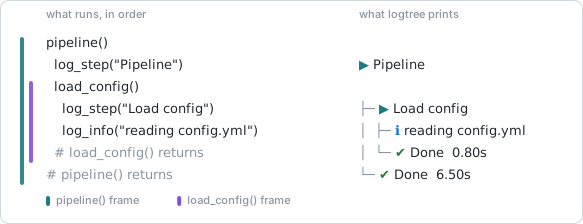
Notice the two rows that print a close line: neither of them is a
log_*() call. They are returns. The close is written by the
frame ending, which is why it cannot be skipped and why nothing has to
remember to balance it.
At the top level
log_step() needs a frame to attach to. At the top level
of a script or console session there is not one – the global environment
never “returns” – so the step would stay open forever. logtree prints a
one-time nudge if you do this, and points you at the manual pair
instead:
See Manual step control.
Reference: log_step(),
log_open(), log_close() ·
Example: Nightly
ETL
Leaf lines and levels
Five functions log a leaf under the current step. They differ in status, in what they mean, and in whether they touch the step around them.
| Function | Level | Elevates its step? | For |
|---|---|---|---|
log_debug() |
most verbose | no | diagnostic detail, hidden by default |
log_info() |
ordinary | no | what is happening |
log_success() |
ordinary | no | a milestone reached |
log_warn() |
high | yes | something survivable went wrong |
log_error() |
highest | yes | something failed, without throwing |
logtree_reset()

fetch <- function() {
  log_step("Fetch")
  log_debug("cache miss for key user:42")
  log_info("requesting from API")
  log_warn("rate limit at 80%")
  log_success("fetched 128 rows")
}

fetch()
#> ▶ Fetch
#> ├─ ℹ requesting from API
#> ├─ ⚠ rate limit at 80%
#> ├─ ✔ fetched 128 rows
#> └─ ⚠ Done  0.00s
The debug line is missing because the default threshold is
"info"; see Verbosity.
All five take the same two extra arguments: close = TRUE
closes the enclosing step immediately after logging the line, and
summary = TRUE/FALSE pins the line into the
run digest or keeps it out regardless of its status (see The run digest).
Reference: log_info(),
log_success(), log_warn(),
log_error(), log_debug()
Status elevation
log_warn() and log_error() do something the
other three do not: they raise the status of the nearest open step, so
its close line reports the outcome even though the function that opened
it returned normally.
Statuses are ordered
running < success < warning < error, and elevation
only ever moves up that order. One warning among fifty successes leaves
the step marked as a warning; a later success cannot quietly clear
it.
logtree_reset()

parse_rows <- function() {
  log_step("Parse rows")
  log_info("1,200 rows")
  log_warn("coerced 3 rows to NA")
  log_success("parsed")            # does not undo the warning
}

parse_rows()
#> ▶ Parse rows
#> ├─ ℹ 1,200 rows
#> ├─ ⚠ coerced 3 rows to NA
#> ├─ ✔ parsed
#> └─ ⚠ Done  0.00s
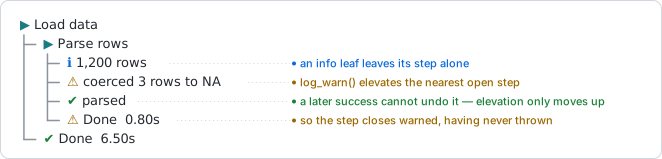
Nothing was thrown here. log_error() behaves the same
way – it records a failure and lets the run continue, which is what you
want for an error you have already recovered from. When you know the
recovery worked, close the step explicitly to override the elevated
glyph:
logtree_reset()

connect <- function() {
  log_step("Connect")
  log_error("primary unreachable (timeout after 5s)")
  log_info("failing over to replica")
  log_success("connected to replica")
  log_close(status = "success")    # override: we recovered
}

connect()
#> ▶ Connect
#> ├─ ✖ primary unreachable (timeout after 5s)
#> ├─ ℹ failing over to replica
#> ├─ ✔ connected to replica
#> └─ ✔ Done  0.00s
Reference: log_warn(),
log_error(), log_close() ·
Example: A
recovered failure
Uncaught errors
Elevation covers errors you handle. For errors you do not, wrap the
run in with_logging(). It installs a calling handler that,
at the moment the error is signalled and before the
stack unwinds, marks every currently-open step as failed and logs the
condition message as a leaf at the depth it happened. Then it prints its
run summary line and rethrows.
logtree_reset()

apply_migration <- function() {
  log_step("Apply migration")
  log_info("adding column users.tier")
  stop("constraint violation on users.email")
}

release <- function() {
  log_step("Release v2.1")
  apply_migration()
}

with_logging(release())
#> ▶ Release v2.1
#> ├─ ▶ Apply migration
#> │  ├─ ℹ adding column users.tier
#> │  ├─ ✖ constraint violation on users.email
#> │  └─ ✖ Done  0.00s
#> └─ ✖ Done  0.00s
#> ✖ Run failed in 0.00s
#> Error in `apply_migration()`:
#> ! constraint violation on users.email
with_logging() never swallows an error. The
Error in ... line above is the original condition, rethrown
after logging – so tryCatch() around the whole thing still
works exactly as it would have.
Without with_logging(), depth tracking is still correct,
because the close is tied to the frame either way. What is lost is the
diagnosis: no handler saw the condition, so the step cannot be painted
red retroactively. It closes as interrupted – a dimmed
glyph meaning “this never finished” – rather than claiming success:
logtree_reset()

risky <- function() {
  log_step("Risky")
  stop("boom")
}

try(risky(), silent = TRUE)
#> ▶ Risky
#> └─ ◌ Done  0.00s
That distinction is worth keeping in mind when reading a saved log: a dimmed step means the run was not wrapped, not that the failure was less serious.
with_logging(global = TRUE) installs the same handling
at the top level of a script, where there is no expression to wrap – see
Recipes.
Reference: with_logging() ·
Example: A
migration that fails
Routing R conditions
R code you call is going to warning() and
message() at you. By default those go to stderr, outside
the tree, and end up in a different file or nowhere at all.
with_logging(warnings = TRUE) routes them in: a
warning() becomes a log_warn() leaf and a
message() becomes a log_info() leaf, at the
depth where it happened.
logtree_reset()

noisy <- function() {
  log_step("Load data")
  message("using cached schema")
  warning("3 rows coerced to NA")
  log_info("1,200 rows")
}

with_logging(noisy(), summary = FALSE, warnings = TRUE)
#> ▶ Load data
#> ├─ ℹ using cached schema
#> ├─ ⚠ 3 rows coerced to NA
#> ├─ ℹ 1,200 rows
#> └─ ⚠ Done  0.00s
Once routed they are ordinary leaves: they reach every sink, they
reach the digest, and the routed warning elevates its step exactly as
log_warn() would. In real terminal colour that reads
as:

What it costs
Routing means muffling. A routed condition stops at the leaf, so it
no longer reaches warnings(), your own handlers, or stderr.
The tree becomes the single record of the run – which is the point – but
it is a trade, and a routed warning also elevates its enclosing step, so
wrapping third-party code that warns freely will turn steps yellow.
That is why it is opt-in, and why you can name one kind and not the other:
warnings = |
warning() |
message() |
|---|---|---|
FALSE (default) |
stderr, untouched | stderr, untouched |
TRUE |
log_warn() leaf, muffled, elevates the step |
log_info() leaf, muffled |
"warning" |
log_warn() leaf, muffled, elevates the step |
stderr, untouched |
"message" |
stderr, untouched |
log_info() leaf, muffled |
Reference: with_logging()
Manual step control
log_open() opens a step and returns its id;
log_close() closes it. They are the pair to reach for
wherever there is no function frame to hang a close on – the top level
of a script, a loop body, a block of a report.
logtree_reset()

id <- log_open("Import")
#> ▶ Import
log_info("reading three files")
#> ├─ ℹ reading three files
log_success("9,412 rows")
#> ├─ ✔ 9,412 rows
log_close(id)
#> └─ ✔ Done  0.00s
log_close() with no arguments closes the innermost open
step, which is usually what you want; passing an id closes that specific
one (and anything still open inside it). status = overrides
the outcome, as in Status elevation
above.
Two shortcuts cover the common cases. Every leaf function takes
close = TRUE, which logs the line and closes the step in
one call:
logtree_reset()

id <- log_open("Publish")
#> ▶ Publish
log_success("pushed to production", close = TRUE)
#> └─ ✔ pushed to production
And log_step() and log_open() take
parent = for the rare case where a step belongs under
something other than the innermost open node.
Re-running the same line
At the top level, a step is keyed on its own source location.
Re-running the same log_open() line in RStudio or Positron
therefore re-anchors to the same node rather than nesting a level deeper
on every run – so an interactive session where you keep re-evaluating a
block does not walk off the right edge of the console.
Reference: log_open(),
log_close(), log_step()
Grouping
Sometimes a run has twenty steps that are all the same kind
of thing, and nesting each on its own line buries the structure.
group = collapses adjacent steps that share a value under
one header:
logtree_reset()

load_file <- function(dataset, file) {
  log_step(file, group = dataset)
  log_info("reading rows")
  log_success("merged")
}

import_datasets <- function() {
  log_step("Import datasets")
  load_file("sales",   "2023.csv")
  load_file("sales",   "2024.csv")
  load_file("returns", "2024.csv")
}

import_datasets()
#> ▶ Import datasets
#> ├─ ▣ sales
#> │  ├─ ▶ 2023.csv
#> │  │  ├─ ℹ reading rows
#> │  │  ├─ ✔ merged
#> │  │  └─ ✔ Done  0.00s
#> │  ├─ ▶ 2024.csv
#> │  │  ├─ ℹ reading rows
#> │  │  ├─ ✔ merged
#> │  │  └─ ✔ Done  0.00s
#> │  └─ ✔ Done  0.01s
#> ├─ ▣ returns
#> │  ├─ ▶ 2024.csv
#> │  │  ├─ ℹ reading rows
#> │  │  ├─ ✔ merged
#> │  │  └─ ✔ Done  0.00s
#> │  └─ ✔ Done  0.00s
#> └─ ✔ Done  0.01s
Pass a bare value to use it as both the match key and the header, or
c(name = value) to show a fixed name while
grouping on value.
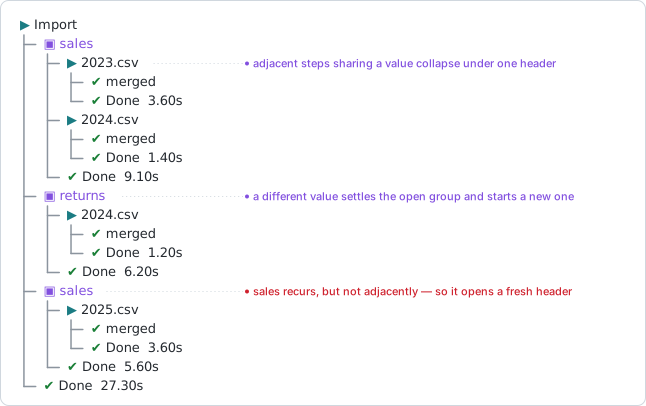
The rule that catches people out is adjacency – a value that comes back later opens a second header rather than rejoining the first:
Three properties are worth knowing:
- Grouping is adjacency-based. A group stays open across calls with a matching value and closes as soon as something else appears at its level – a step with a different value, a plain ungrouped step, or a leaf. The same value recurring later opens a fresh group rather than reopening the old header. This keeps the tree in chronological order; a global grouping would have to reorder the run to be useful.
- A group is not tied to a frame. It lingers after its last member closes, waiting to see whether the next entry joins it, and is popped when the enclosing step finishes.
- A group’s status is aggregated from its members. If one file fails, the group’s own close line carries the error glyph, so a collapsed group never hides a failure inside it.
Reference: log_step(),
log_open() · Example: Importing
many files
Verbosity
logtree_threshold() sets the minimum leaf level to
render: "debug", "info" (the default),
"warn", or "error".
logtree_reset()

fetch_verbose <- function() {
  log_step("Fetch")
  log_debug("cache miss for key user:42")
  log_info("connecting to API")
  log_success("fetched 12 records")
}

fetch_verbose()                  # default: the debug line is hidden
#> ▶ Fetch
#> ├─ ℹ connecting to API
#> ├─ ✔ fetched 12 records
#> └─ ✔ Done  0.00s

logtree_threshold("debug")
fetch_verbose()                  # raised: it appears
#> ▶ Fetch
#> ├─ ⚙ cache miss for key user:42
#> ├─ ℹ connecting to API
#> ├─ ✔ fetched 12 records
#> └─ ✔ Done  0.00s

logtree_threshold("info")
Two rules keep this from doing damage:
- Step open and close lines are never gated. Hiding them would break the tree structure, so a threshold only ever removes leaves.
-
Verbosity is a rendering gate, not a recording one.
A
log_warn()suppressed bylogtree_threshold("error")still elevates its step’s close glyph and still reaches the run digest. What you chose not to print is not the same as what did not happen.
logtree_threshold() is only the default. Each
sink can pin a level of its own, so a debug-level log file does not drag
the console down with it – see Output
sinks.
Reference: logtree_threshold()
The run digest
A long tree scrolls. logtree_summary() prints a digest
of everything that went wrong since the last
logtree_reset() – every warning, error, and interrupted
step, plus any line pinned with summary = TRUE – each with
a breadcrumb showing where in the tree it happened.
logtree_reset()

migrate <- function() {
  log_step("Apply migration")
  log_warn("table lock held 800ms")
  log_error("constraint violation on users.email")
}

smoke_test <- function() {
  log_step("Smoke test")
  log_success("all endpoints 200")
}

release <- function() {
  log_step("Release v2.1")
  migrate()
  smoke_test()
}

with_logging(release(), summary = FALSE)
#> ▶ Release v2.1
#> ├─ ▶ Apply migration
#> │  ├─ ⚠ table lock held 800ms
#> │  ├─ ✖ constraint violation on users.email
#> │  └─ ✖ Done  0.00s
#> ├─ ▶ Smoke test
#> │  ├─ ✔ all endpoints 200
#> │  └─ ✔ Done  0.00s
#> └─ ✔ Done  0.00s
logtree_summary()
#>
#> ── Summary: 1 error, 1 warning ─────────────────────────────────────────────────
#> ⚠ Release v2.1 › Apply migration › table lock held 800ms
#> ✖ Release v2.1 › Apply migration › constraint violation on users.email
Two different things are called a summary here, and it is worth keeping them apart:
-
The run summary line –
Run complete in 0.15s, orRun failed in ...– is printed bywith_logging()itself. Itssummary =argument controls that one line, and nothing else. The example above passessummary = FALSEpurely to keep the output tidy. -
The digest is the block above, and it only appears
when you call
logtree_summary(). It is never printed for you, because what belongs in it depends on the run: a script wants it at the end, a test wants it not at all.
The digest also survives things the tree does not. A warning hidden
by logtree_threshold("error") still reaches it, and so does
one from a muted run.
Three arguments shape it: filter restricts to given
statuses, depth trims each breadcrumb to its N deepest
nodes (useful when the tree is deep and the full path is noise), and
trace pins the call-site column for this one call.
logtree_summary(filter = "error", depth = 1)
#>
#> ── Summary: 1 error ────────────────────────────────────────────────────────────
#> ✖ constraint violation on users.email
Reference: logtree_summary(),
logtree_reset() · Example: A
migration that fails
Call sites
The digest says what went wrong. The trace
theme slot says where: it annotates lines with
file.R:line fn(), and the location is a terminal hyperlink,
so a click opens your editor at that line.
It is off in every preset, because capturing a call site costs a
frame walk per logged line. show = "problems" is the usual
setting – warnings, errors, and interrupted steps, which is where you
actually want a location:
logtree_reset()
logtree_theme(list(trace = list(show = "problems", format = "{fn}()")))

flaky <- function() {
  log_step("Parse rows")
  log_info("1,200 rows")
  log_warn("coerced 3 rows")
}

flaky()
#> ▶ Parse rows
#> ├─ ℹ 1,200 rows
#> ├─ ⚠ coerced 3 rows  flaky()
#> └─ ⚠ Done  0.00s
logtree_theme("unicode")
show also takes the statuses themselves –
"running" for open lines, plus "info",
"debug", "success", "warning",
"error", "interrupted" – so
show = "error" annotates errors and leaves tolerated
warnings bare. TRUE marks every line that can carry one. An
ordinary close line never carries a call site whatever you name, since
its site is its own open line’s, two rows up.
format is a template over three placeholders –
{fn} for the enclosing function’s name, {file}
and {line} for where the log call sits – and defaults to
"{file}:{line} {fn}()".
The example above pins "{fn}()" because the vignette
cannot show the other two. {file} and {line}
are read from R’s source references, which only exist when the code was
parsed with keep.source = TRUE: the default interactively
and under devtools::load_all(), but not under plain
Rscript, and not in a knitted chunk. Rather than print
NA, the template is split on whitespace and any run whose
placeholders are all unavailable is dropped whole – so the
default degrades to a bare flaky() here instead of
NA:NA flaky().
Run from a sourced script, where the source references are there, the
same default prints in full (show = TRUE here, to annotate
every line):
▶ Load data  R/pipeline.R:2 load_data()
├─ ▶ Parse rows  R/pipeline.R:7 parse_rows()
│  ├─ ℹ 1,200 rows  R/pipeline.R:8 parse_rows()
│  ├─ ⚠ coerced 3 rows  R/pipeline.R:9 parse_rows()
│  └─ ⚠ Done  0.00s
└─ ✔ Done  0.01s
Each file:line is one hyperlink rather than two pieces
of text: the location is styled and linked as a unit, so clicking it
opens that file at that line in a terminal that supports OSC 8 links,
and is inert plain text in one that does not.
Capturing and printing are separate stages, and only printing
can be decided afterwards – once a run is over its frame stack
is gone. That is what capture is for:
capture = TRUE records a call site on every line whatever
show prints, so a tree that stays exactly as quiet as it
was can still hand locations to the digest or a JSON sink.
logtree_theme(list(trace = list(show = FALSE, capture = TRUE)))
job()                            # tree unchanged, not one call site printed
logtree_summary(trace = TRUE)    # ... but the digest has them
Styling the column, and pinning it per sink, are covered in the Themes cookbook.
Reference: logtree_theme(),
logtree_summary()
Timestamps
A tree says how long each step took, but not when
any of it happened – which starts to matter once a log is read after the
fact rather than watched as it runs. The timestamp slot
puts a wall-clock column in front of every line. It is off in every
preset (format = NULL), so it costs nothing until asked
for.
logtree_reset()
logtree_theme(list(timestamp = list(format = "%H:%M:%S")))
pipeline()
#> 18:43:59 ▶ Pipeline
#> 18:43:59 ├─ ▶ Load config
#> 18:43:59 │  ├─ ℹ reading config.yml
#> 18:43:59 │  ├─ ✔ validated 12 parameters
#> 18:43:59 │  └─ ✔ Done  0.00s
#> 18:43:59 └─ ✔ Done  0.01s
logtree_theme(list(timestamp = list(format = NULL)))
"%H:%M:%S" is the interactive choice;
"%Y-%m-%d %H:%M:%S" is what a saved log wants, since a file
outlives the day it was written.
In the coloured presets the column ships "silver": it is
supporting detail, so it stays faint enough that the status glyphs
remain what your eye lands on.
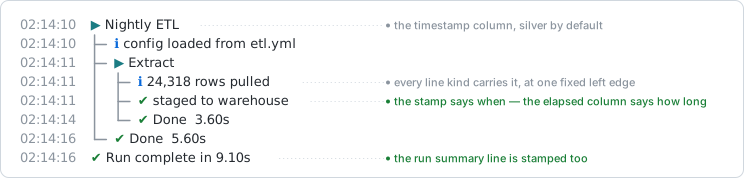
Every line kind takes the column at one fixed left edge, and the width is measured from a rendered sample rather than from the format string, so a format whose width varies with the value cannot shear the tree. The digest is never stamped – it replays events that already happened, so the time it was printed would be the wrong answer.
Reference: logtree_theme(),
logtree_sink_file()
Themes and presets
logtree_theme() swaps the whole glyph and colour preset.
There are five:
| Preset | What it is for |
|---|---|
"unicode" |
The default. Box-drawing connectors, coloured symbol glyphs, for an interactive terminal. |
"ascii" |
Plain ASCII, no colour. Safe for log files and non-UTF-8 terminals; also what every text file sink renders through. |
"emoji" |
Emoji status glyphs (width-2 cells) over box-drawing connectors. |
"minimal" |
No connectors at all – depth is carried by indentation alone. |
"ci" |
Bracketed word glyphs over pure-ASCII connectors, no colour, so a
failure greps as [fail]. |
logtree_theme("ascii")
pipeline()
#> > Pipeline
#> |- > Load config
#> |  |- i reading config.yml
#> |  |- + validated 12 parameters
#> |  |- + Done  0.00s
#> |- + Done  0.00s

logtree_theme("ci")
pipeline()
#> [step]  Pipeline
#> |- [step]  Load config
#> |  |- [info]  reading config.yml
#> |  |- [ok]    validated 12 parameters
#> |  \- [done]  0.00s
#> \- [done]  0.00s

logtree_theme("unicode")
Individual slots are overridden with overrides, a named
list keyed by slot, each element holding only the fields to change:
logtree_theme("unicode", overrides = list(
  success = list(glyph = "*", color = c("green", "bold")),
  done    = list(text = "{label} ok")
))
pipeline()
#> ▶ Pipeline
#> ├─ ▶ Load config
#> │  ├─ ℹ reading config.yml
#> │  ├─ * validated 12 parameters
#> │  └─ ✔ Load config ok  0.00s
#> └─ ✔ Pipeline ok  0.00s
logtree_theme("unicode")
Switching themes never breaks column alignment, because each glyph
declares its own rendered width rather than having it measured –
nchar() cannot reliably size an emoji cell.
The full list of slots and fields, the elapsed-time controls, close-line text templating, and recipes for building your own preset are in the Themes cookbook.
Reference: logtree_theme()
Layout and density
Four arguments control horizontal space, independently of any glyph.
They are scalars carried on the theme, set through
logtree_theme()’s own arguments rather than through
overrides, and cleared by the next preset swap.
| Argument | The gap it sets |
|---|---|
compact |
the per-level tree column: "medium" drops the trailing
gap after each connector, "tight" also slims the connectors
to one character |
connector_gap |
a leaf or close line’s own connector, to its status glyph |
glyph_gap |
the status glyph, to the message text |
wrap |
the column budget a rendered line is capped at |
logtree_theme("unicode", compact = "tight", glyph_gap = 0)
pipeline()
#> ▶Pipeline
#> ├▶Load config
#> │├ℹreading config.yml
#> │├✔validated 12 parameters
#> │└✔Done  0.00s
#> └✔Done  0.00s
logtree_theme("unicode")
wrap = TRUE follows cli::console_width(),
measured at render time so a terminal resized mid-run is picked up on
its own; a number pins a fixed width. Continuation lines indent to the
message column and carry the rails down, so a wrapped message still
reads as one node:
logtree_theme("unicode", wrap = 56)

long <- function() {
  log_step("Deploy")
  log_info("uploading layers to registry.example.internal, 412 MB across 14 layers")
}
long()
#> ▶ Deploy
#> ├─ ℹ uploading layers to registry.example.internal, 412
#> │    MB across 14 layers
#> └─ ✔ Done  0.00s

logtree_theme("unicode")
None of the four reaches file sinks, which render through the ascii preset with its built-in spacing.
Reference: logtree_theme()
Output sinks
Every logged event fans out to every registered sink. The console
sink is registered by default under the reserved id
"console"; logtree_sink_file() adds a
file.
log_path <- tempfile(fileext = ".log")
handle <- logtree_sink_file(log_path, format = "text")

logtree_reset()
pipeline()
#> ▶ Pipeline
#> ├─ ▶ Load config
#> │  ├─ ℹ reading config.yml
#> │  ├─ ✔ validated 12 parameters
#> │  └─ ✔ Done  0.00s
#> └─ ✔ Done  0.00s

writeLines(readLines(log_path))
#> > Pipeline
#> |- > Load config
#> |  |- i reading config.yml
#> |  |- + validated 12 parameters
#> |  |- + Done  0.00s
#> |- + Done  0.00s
format = "json" writes NDJSON instead – one record per
line, with the event kind, level, depth, label, status, elapsed time, an
ISO-8601 timestamp, and a run_id so one run’s lines can be
picked out of a file many runs appended to.
Every registration returns a handle. Sinks deliberately survive
logtree_reset() – they are configuration, not run state –
so logtree_sink_remove() is the only way to stop one:
logtree_sinks()
#> [1] "console" "sink1"
logtree_sink_remove(handle)
logtree_sinks()
#> [1] "console"
logtree_sink() registers a sink of your own: any
function of one argument, called with each event. A sink that throws is
skipped rather than allowed to break the fanout – the remaining sinks
still run, and a warning naming the offender is raised once.
kinds <- character(0)
h <- logtree_sink(function(event) kinds <<- c(kinds, event$kind))

logtree_reset()
pipeline()
#> ▶ Pipeline
#> ├─ ▶ Load config
#> │  ├─ ℹ reading config.yml
#> │  ├─ ✔ validated 12 parameters
#> │  └─ ✔ Done  0.00s
#> └─ ✔ Done  0.01s
table(kinds)
#> kinds
#> close  leaf  open
#>     2     2     2

logtree_sink_remove(h)
Each sink takes its own threshold =, defaulting to the
global logtree_threshold() read afresh per event. This is
how a log file captures debug detail while the console stays at
"info":
verbose_path <- tempfile(fileext = ".log")
h <- logtree_sink_file(verbose_path, format = "text", threshold = "debug")

logtree_reset()
fetch_verbose()          # console: no debug line
#> ▶ Fetch
#> ├─ ℹ connecting to API
#> ├─ ✔ fetched 12 records
#> └─ ✔ Done  0.00s

writeLines(readLines(verbose_path))   # file: it is there
#> > Fetch
#> |- d cache miss for key user:42
#> |- i connecting to API
#> |- + fetched 12 records
#> |- + Done  0.00s
logtree_sink_remove(h)
File sinks also take trace = and
timestamp =, pinning those columns independently of the
console’s.
Reference: logtree_sink_file(),
logtree_sink(), logtree_sinks(),
logtree_sink_remove() · Examples: A
CI build log, Structured
NDJSON
Testing your logging
If your package logs with logtree, you will eventually want to assert that a pipeline logged what it should. Capturing console output and pattern-matching glyphs and connectors is the wrong tool – it breaks when the theme changes and it tests the renderer rather than your code.
logtree_sink_memory() collects events in a capped
buffer, and logtree_sink_memory_events() reads them back as
a data frame, one row per event, with the same columns a JSON sink
writes:
h <- logtree_sink_memory()

logtree_reset()
pipeline()
#> ▶ Pipeline
#> ├─ ▶ Load config
#> │  ├─ ℹ reading config.yml
#> │  ├─ ✔ validated 12 parameters
#> │  └─ ✔ Done  0.00s
#> └─ ✔ Done  0.00s

events <- logtree_sink_memory_events(h)
events[, c("level", "depth", "label", "status")]
#>   level depth                   label  status
#> 1  open     1                Pipeline    step
#> 2  open     2             Load config    step
#> 3  leaf     2      reading config.yml    info
#> 4  leaf     2 validated 12 parameters success
#> 5 close     2             Load config success
#> 6 close     1                Pipeline success

logtree_sink_remove(h)
Note the column names, since they are easy to guess wrong:
level is the kind of event ("open",
"leaf", "close", "group",
"group_close") and status is its outcome
("step", "info", "success",
"warning", …). The full set is ts,
run_id, level, id,
parent_id, depth, label,
elapsed, status, fn,
file, line. A sink function registered with
logtree_sink() receives a different shape – an event
list, whose kind is event$kind.
Both views are built from one shared record, so a run replayed from a log file and the same run read from memory cannot disagree.
Reference: logtree_sink_memory(),
logtree_sink_memory_events() · Example: Asserting
in tests
Silence
logtree_mute() stops every sink receiving events without
unregistering any of them – what a library that logs with logtree
reaches for to keep its own test suite quiet.
logtree_unmute() turns it back on, and both return the
state they replaced, so a caller can restore what it found.
was <- logtree_mute()

logtree_reset()
pipeline()          # prints nothing

logtree_unmute()
length(logtree_summary())
#>
#> ── Summary: nothing to report ──────────────────────────────────────────────────
#> [1] 0
A muted run is still recorded: the digest can still report what went wrong, and step bookkeeping is untouched, so depth is right the moment output comes back.
Reference: logtree_mute()
logger integration
If your codebase already uses the CRAN logger package,
logtree_logger() routes those calls through logtree without
rewriting any of them. Call it once near the top of your script: it
registers logtree’s layout, pairs it with
logger::appender_void so logtree does the rendering, and
opens logger’s own threshold so logtree_threshold() becomes
the single gate.
logtree_reset()
logtree_threshold("debug")

ns <- "my_app"
logtree_logger(namespace = ns)

process_data <- function() {
  log_step("Processing data")
  logger::log_info("reading input file", namespace = ns)
  logger::log_debug("parsed 5,000 rows", namespace = ns)
  logger::log_success("transformation complete", namespace = ns)
}

process_data()
#> ▶ Processing data
#> ├─ ℹ reading input file
#> ├─ ⚙ parsed 5,000 rows
#> ├─ ✔ transformation complete
#> └─ ✔ Done  0.00s
logtree_threshold("info")
Severities map onto leaf levels:
FATAL/ERROR become log_error(),
WARN becomes log_warn(), SUCCESS
becomes log_success(), INFO becomes
log_info(), and DEBUG/TRACE both
become log_debug() – logger has two debug-ish tiers,
logtree has one.
Reference: logtree_logger(),
layout_logtree() · Example: Bridging
logger
Where to go next
- Examples – complete end-to-end runs.
- Themes cookbook – every slot and field, and recipes for your own preset.
- Recipes – top-level scripts, library authors, scheduled jobs.
- Design philosophy – why depth is tied to frames, and why the corner connector only ever appears on a close line.