
Everything logtree_theme() can change, and the reference
tables for looking it up. The Get
started guide covers the parts you need on day one; this is the
rest.
Every example below renders the same little tree, so the styling change is the only difference:
demo <- function() {
  load_config <- function() {
    log_step("Load config")
    log_info("reading config.yml")
    log_success("validated 12 parameters")
  }
  pipeline <- function() {
    log_step("Pipeline")
    load_config()
    log_warn("using a stale cache")
  }
  logtree_reset()
  pipeline()
}
The five presets
for (preset in c("unicode", "ascii", "emoji", "minimal", "ci")) {
  cat("\n", preset, "\n", sep = "")
  logtree_theme(preset)
  demo()
}
#>
#> unicode
#> ▶ Pipeline
#> ├─ ▶ Load config
#> │  ├─ ℹ reading config.yml
#> │  ├─ ✔ validated 12 parameters
#> │  └─ ✔ Done  0.00s
#> ├─ ⚠ using a stale cache
#> └─ ⚠ Done  0.01s
#>
#> ascii
#> > Pipeline
#> |- > Load config
#> |  |- i reading config.yml
#> |  |- + validated 12 parameters
#> |  |- + Done  0.00s
#> |- ! using a stale cache
#> |- ! Done  0.00s
#>
#> emoji
#> 🔹 Pipeline
#> ├─ 🔹 Load config
#> │  ├─ 💡 reading config.yml
#> │  ├─ ✅ validated 12 parameters
#> │  └─ ✅ Done  0.00s
#> ├─ ⚠️ using a stale cache
#> └─ ⚠️ Done  0.00s
#>
#> minimal
#> ▸ Pipeline
#>   ▸ Load config
#>     · reading config.yml
#>     ✓ validated 12 parameters
#>     ✓ 0.00s
#>   ! using a stale cache
#>   ! 0.00s
#>
#> ci
#> [step]  Pipeline
#> |- [step]  Load config
#> |  |- [info]  reading config.yml
#> |  |- [ok]    validated 12 parameters
#> |  \- [done]  0.00s
#> |- [warn]  using a stale cache
#> \- [warn]  0.00s
logtree_theme("unicode")
"minimal" drops the connectors entirely –
branch, corner and pipe are empty
strings, so a level costs nothing but its indentation. The trade is
worth knowing: info, debug and
interrupted all render the middle dot and are told apart by
colour alone.
"ci" is built for log capture rather than a terminal.
The bracketed words are different lengths on purpose; each declares its
true width, so the message column still lines up.
Overriding slots
overrides is a named list keyed by slot, each element
holding only the fields to change. Everything else is kept from the
active theme.
logtree_theme("unicode", overrides = list(
  success = list(glyph = "*", color = c("green", "bold")),
  group   = list(bracket = TRUE)
))
demo()
#> ▶ Pipeline
#> ├─ ▶ Load config
#> │  ├─ ℹ reading config.yml
#> │  ├─ * validated 12 parameters
#> │  └─ ✔ Done  0.00s
#> ├─ ⚠ using a stale cache
#> └─ ⚠ Done  0.00s
logtree_theme("unicode")
The tick on a log_success() line and the tick on a
step’s own close line are two different slots – success and
done – that merely ship the same glyph in every preset.
Restyle one and the other stays as it was:
logtree_theme("unicode", overrides = list(
  done = list(glyph = "=", color = "silver")
))
demo()
#> ▶ Pipeline
#> ├─ ▶ Load config
#> │  ├─ ℹ reading config.yml
#> │  ├─ ✔ validated 12 parameters
#> │  └─ = Done  0.00s
#> ├─ ⚠ using a stale cache
#> └─ ⚠ Done  0.00s
logtree_theme("unicode")
Accepted slots
| Slot | Applies to | Fields it accepts |
|---|---|---|
step |
open / running step glyph |
glyph, width, color
|
info |
log_info() leaf |
glyph, width, color
|
debug |
log_debug() leaf |
glyph, width, color
|
success |
log_success() leaf |
glyph, width, color
|
done |
a step’s own close line on a clean close |
glyph, width, color,
text
|
warning |
log_warn() / elevated step glyph |
glyph, width, color,
text
|
error |
log_error() / elevated step glyph |
glyph, width, color,
text
|
interrupted |
abnormal-exit (dimmed) glyph |
glyph, width, color,
text
|
group |
group header marker |
glyph, color, bracket
|
elapsed |
the elapsed-time column on every close line |
show, min, color,
slow, slow_color
|
trace |
the optional call-site column |
show, format, color,
capture
|
timestamp |
the optional wall-clock column |
format, color
|
branch |
child connector |
glyph, color
|
corner |
close-line connector |
glyph, color
|
pipe |
vertical rail |
glyph, color
|
crumb |
logtree_summary() breadcrumb separator |
glyph, color, path_color
|
summary |
logtree_summary() divider above the digest |
gap, rule, line
|
Accepted fields
| Field | Type | Accepted values |
|---|---|---|
glyph |
character(1) |
Any string, including "". |
width |
integer(1) |
Rendered display width of the glyph (1 normal,
2 emoji/wide). Sets column alignment; status slots
only. |
color |
character / NULL / list
|
One or more cli styles, or NULL. Named
("red", "cyan", …), bright
("br_red"), backgrounds ("bg_blue"), styles
("bold", "dim", "italic"), or hex
("#ff8800"). A vector combines them. On trace,
a named list styles the parts separately: location,
fn, base. |
text |
character(1) |
Close-line status slots only (done,
warning, error, interrupted). The
word a close line prints before its time; "" drops it.
Expands {label} and {elapsed}. |
show |
logical(1) / character
|
On elapsed, FALSE drops the time column.
On trace, FALSE (default) is off,
TRUE marks every line that can carry a call site,
"problems" is shorthand for
c("warning", "error", "interrupted"), and a status vector
names exactly what to mark. |
format |
character(1) |
On trace, a template over {fn},
{file}, {line}; default
"{file}:{line} {fn}()". On timestamp, a
strftime format; NULL (the default) is
off. |
capture |
logical(1) |
trace only. TRUE records call sites even
where show prints none. Default FALSE; it only
ever adds. |
min |
numeric(1) |
elapsed only. Hide times below this many seconds. |
slow |
numeric(1) / NULL
|
elapsed only. Times at or over this count as slow. |
slow_color |
character / NULL
|
elapsed only. Styles a slow time in place of
color. |
bracket |
logical(1) |
group only. TRUE wraps the header name in
< >. |
path_color |
character / NULL
|
crumb only. Styles the breadcrumb’s path nodes. |
gap |
integer(1) |
summary only. Blank lines above the digest. |
rule |
logical(1) / character(1)
|
summary only. The divider drawn above the digest. |
line |
integer(1) / character(1)
|
summary only. The rule’s line type. |
Close lines and elapsed time
The word a step prints when it closes is the text field
of a theme slot. It is read from the closing status’s own slot, falling
back to done’s and then to the built-in "Done"
– so one call renames every close line, and a narrower one renames only
the outcomes that went wrong. Two placeholders expand:
{label} (the step’s own label, or a group’s name) and
{elapsed}.
logtree_theme("unicode", overrides = list(
  done    = list(text = "{label} ok"),
  warning = list(text = "{label} finished with warnings")
))
demo()
#> ▶ Pipeline
#> ├─ ▶ Load config
#> │  ├─ ℹ reading config.yml
#> │  ├─ ✔ validated 12 parameters
#> │  └─ ✔ Load config ok  0.00s
#> ├─ ⚠ using a stale cache
#> └─ ⚠ Pipeline finished with warnings  0.00s
logtree_theme("unicode")
text governs close lines only – a
log_error() leaf keeps its own message – and
text = "" drops the word entirely, leaving the glyph and
the time.
The time itself is the elapsed slot. min
hides anything faster than a threshold, which is how you silence
0.00s noise on trivial steps, while slow and
slow_color flag the ones worth noticing:
logtree_theme("unicode", overrides = list(
  elapsed = list(min = 0.001, color = "silver", slow = 1, slow_color = "red")
))
demo()
#> ▶ Pipeline
#> ├─ ▶ Load config
#> │  ├─ ℹ reading config.yml
#> │  ├─ ✔ validated 12 parameters
#> │  └─ ✔ Done  0.00s
#> ├─ ⚠ using a stale cache
#> └─ ⚠ Done  0.00s
logtree_theme("unicode")
Nothing in demo() runs long enough to trip that
slow = 1, so every time above stayed silver. With a step
that does, the time turns red – and only the time, since
slow_color replaces color on that one field
and leaves the glyph and the close-line word alone:
slow_demo <- function() {
  build_index <- function() {
    log_step("Build index")
    Sys.sleep(0.4)
    log_success("18,204 documents")
  }
  pipeline <- function() {
    log_step("Pipeline")
    log_info("reading config.yml")
    build_index()
  }
  logtree_reset()
  pipeline()
}

logtree_theme("unicode", overrides = list(
  elapsed = list(min = 0.001, color = "silver", slow = 0.25, slow_color = "red")
))
slow_demo()
#> ▶ Pipeline
#> ├─ ℹ reading config.yml
#> ├─ ▶ Build index
#> │  ├─ ✔ 18,204 documents
#> │  └─ ✔ Done  0.40s
#> └─ ✔ Done  0.40s
logtree_theme("unicode")
Both close lines are flagged, because a step’s elapsed time includes
everything it called: a slow child makes its parents slow too. Reading
down a tree for the deepest red line is how you find where the time
actually went. slow = NULL – the default in every preset –
turns the comparison off entirely.
show = FALSE drops the column outright. The
with_logging() run summary line takes the slot’s colouring
but never its hiding rules, since
Run complete in <time> would read as an unfinished
sentence without its time.
The timestamp column
timestamp puts a wall-clock column in front of every
line. It ships format = NULL in every preset, so it costs
nothing until asked for.
logtree_theme(list(timestamp = list(format = "%H:%M:%S")))
demo()
#> 11:05:50 ▶ Pipeline
#> 11:05:50 ├─ ▶ Load config
#> 11:05:50 │  ├─ ℹ reading config.yml
#> 11:05:50 │  ├─ ✔ validated 12 parameters
#> 11:05:50 │  └─ ✔ Done  0.00s
#> 11:05:50 ├─ ⚠ using a stale cache
#> 11:05:50 └─ ⚠ Done  0.00s
logtree_theme(list(timestamp = list(format = NULL)))
"%H:%M:%S" is the interactive choice;
"%Y-%m-%d %H:%M:%S" is what a saved log wants, since a file
outlives the day it was written.
In the coloured presets the column ships "silver" –
supporting detail that stays out of the way:
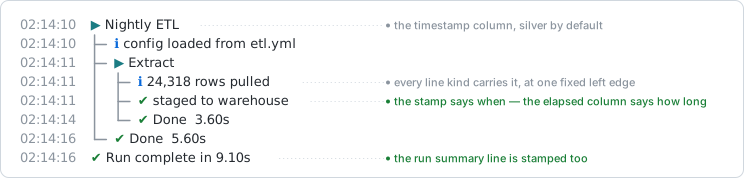
color takes the same values as any other slot:
logtree_theme(list(timestamp = list(format = "%H:%M:%S",
                                    color = c("bold", "blue"))))
demo()
#> 11:05:50 ▶ Pipeline
#> 11:05:50 ├─ ▶ Load config
#> 11:05:50 │  ├─ ℹ reading config.yml
#> 11:05:50 │  ├─ ✔ validated 12 parameters
#> 11:05:50 │  └─ ✔ Done  0.00s
#> 11:05:50 ├─ ⚠ using a stale cache
#> 11:05:50 └─ ⚠ Done  0.01s
logtree_theme(list(timestamp = list(format = NULL, color = "silver")))
Three properties worth knowing:
- The column is padded to a fixed width measured from a rendered sample, not from the format string, so a format whose width varies with the value cannot shear the tree from one line to the next.
- It counts against the wrapping budget like any other column, and a wrapped message’s continuation rows carry a blank column rather than a repeated time.
- The digest is never stamped: it replays events that already happened, so the time it was printed would be the wrong answer.
A file sink pins its own column with
logtree_sink_file(timestamp = ), and a "json"
sink always carries an ISO-8601 ts regardless.
The call-site column
trace annotates a line with where the log call came from
– file.R:line fn(), in a column of its own after the
message. It ships show = FALSE in every preset, since
capturing a call site costs a frame walk per logged line.

That figure is a rendered capture rather than a live chunk, and the
reason shapes every example below it: {file} and
{line} are read from source references, which knitted
chunks do not carry. Run from a script or an interactive session these
examples would each print a location too; here they can only print
fn().
Choosing which lines are marked
show names the statuses worth a location. Marking
everything is rarely what you want – a location on a line you were never
going to investigate is a column of noise.
show = |
Marks |
|---|---|
FALSE (the default) |
nothing – and nothing is captured either, unless
capture asks for it |
TRUE |
every line that can carry one |
"problems" |
shorthand for c("warning", "error", "interrupted")
|
| a status vector | exactly those, from running, info,
debug, success, warning,
error, interrupted
|
"running" is the odd one: it names a step’s
open line rather than a leaf, which is how you annotate where
each step was started from.
logtree_theme("unicode", overrides = list(
  trace = list(show = c("running", "warning"), format = "{fn}()")
))
demo()
#> ▶ Pipeline  pipeline()
#> ├─ ▶ Load config  load_config()
#> │  ├─ ℹ reading config.yml
#> │  ├─ ✔ validated 12 parameters
#> │  └─ ✔ Done  0.00s
#> ├─ ⚠ using a stale cache  pipeline()
#> └─ ⚠ Done  0.00s
logtree_theme("unicode")
Two rules are not settings. An ordinary close line never carries a
call site whatever you name – its site is its own open line’s, a few
rows up, as the Done lines above show. A close line that
unwound is the exception, under "interrupted":
there is no accompanying leaf to hang the location on, and it is the one
line where you most want it.
logtree_theme("unicode", overrides = list(
  trace = list(show = "problems", format = "{fn}()")
))

risky <- function() {
  log_step("Risky")
  stop("boom")
}

logtree_reset()
try(risky(), silent = TRUE)
#> ▶ Risky
#> └─ ◌ Done  0.00s  risky()
logtree_theme("unicode")
The template
format is a template over {fn},
{file} and {line}, defaulting to
"{file}:{line} {fn}()". Literal text between the
placeholders is kept, so the column can be made to read as a sentence
rather than a coordinate:
logtree_theme("unicode", overrides = list(
  trace = list(show = "problems", format = "logged in {fn}()")
))
demo()
#> ▶ Pipeline
#> ├─ ▶ Load config
#> │  ├─ ℹ reading config.yml
#> │  ├─ ✔ validated 12 parameters
#> │  └─ ✔ Done  0.00s
#> ├─ ⚠ using a stale cache  logged in pipeline()
#> └─ ⚠ Done  0.00s
logtree_theme("unicode")
The template is split on whitespace, and a run whose placeholders are
all unavailable is dropped whole rather than rendered as
NA. That is what makes the default degrade cleanly to
pipeline() in these chunks – and it is worth knowing before
writing a format like "{file}:{line}", which has nothing
left to fall back to and renders as an empty column wherever source
references are missing.
Styling the parts
trace$color takes either a character vector – styling
the whole column – or a named list styling its parts separately:
location for a {file}/{line} run,
fn for the function name, and base for
everything else, which in the default format is the ().
logtree_theme("unicode", overrides = list(
  trace = list(show = "problems", color = list(fn = "magenta"))
))
demo()
#> ▶ Pipeline
#> ├─ ▶ Load config
#> │  ├─ ℹ reading config.yml
#> │  ├─ ✔ validated 12 parameters
#> │  └─ ✔ Done  0.00s
#> ├─ ⚠ using a stale cache  pipeline()
#> └─ ⚠ Done  0.00s
logtree_theme("unicode")
The coloured presets ship exactly that shape –
base = "dim", location = c("dim", "silver"),
fn = c("dim", "cyan") – which is how the whole column stays
faint while its two halves still read apart, as in the figure above. A
plain vector is shorthand for setting base alone.
A run mentioning {file}/{line} is treated
as one unit, separator included, and carries a single terminal
hyperlink, so a click anywhere on it opens the file at that line. The
escape has no printable width, and terminals without OSC 8 support drop
it, so nothing about the layout changes either way.
Recording without printing
Capture and rendering are separate stages, and only rendering can be
decided after the run: by the time a digest is printed the frame stack
that answered “where?” is gone. capture = TRUE records a
call site on every line whatever show prints, which is what
a quiet console with an annotated digest – or a JSON sink carrying
locations the terminal never showed – is built from.
logtree_theme("unicode", overrides = list(
  trace = list(show = FALSE, capture = TRUE, format = "{fn}()")
))
demo()
#> ▶ Pipeline
#> ├─ ▶ Load config
#> │  ├─ ℹ reading config.yml
#> │  ├─ ✔ validated 12 parameters
#> │  └─ ✔ Done  0.00s
#> ├─ ⚠ using a stale cache
#> └─ ⚠ Done  0.00s
logtree_summary(trace = TRUE)
#>
#> ── Summary: 1 warning ──────────────────────────────────────────────────────────
#> ⚠ Pipeline › using a stale cache  pipeline()
logtree_theme("unicode")
logtree_summary(trace = ) swaps the slot’s
show for that one call, so a digest can name locations the
tree kept quiet. It can only ever narrow what was captured, though: with
capture = FALSE and show = FALSE for the run,
no trace = here can invent what was never recorded.
A sink asks in its own right, and registering one with
trace = is itself enough to switch capture on – a sink
cannot render a column that was never populated:
logtree_sink_file(path, format = "text", trace = TRUE)   # its own column
logtree_sink_file(path, format = "json", trace = TRUE)   # fn/file/line fields
Neither disturbs the console: a run can print no call sites at all while the file beside it records every one.
Density and spacing
Four arguments control horizontal space. They are scalars carried
on the theme, not override slots: set them through
logtree_theme()’s own arguments, and the next preset swap
clears them.
| Argument | The gap it sets |
|---|---|
compact |
the per-level tree column: "medium" drops the trailing
gap after each connector, "tight" also slims the connectors
to one character |
connector_gap |
a leaf or close line’s own connector, to its status glyph |
glyph_gap |
the status glyph, to the message text |
wrap |
the column budget a rendered line is capped at |
logtree_theme("unicode", compact = "medium")
demo()
#> ▶ Pipeline
#> ├─▶ Load config
#> │ ├─ℹ reading config.yml
#> │ ├─✔ validated 12 parameters
#> │ └─✔ Done  0.00s
#> ├─⚠ using a stale cache
#> └─⚠ Done  0.00s

logtree_theme("unicode", compact = "tight", glyph_gap = 0)
demo()
#> ▶Pipeline
#> ├▶Load config
#> │├ℹreading config.yml
#> │├✔validated 12 parameters
#> │└✔Done  0.00s
#> ├⚠using a stale cache
#> └⚠Done  0.00s

logtree_theme("unicode")
connector_gap is unset by default and tracks the tree’s
own column gap, so every preset renders as it always has. Setting it
lets the two diverge – which is what it is for:
compact = "tight" keeps every rail column flush while leaf
and close glyphs still get air.
logtree_theme("unicode", compact = "tight", connector_gap = 1)
demo()
#> ▶ Pipeline
#> ├▶ Load config
#> │├ ℹ reading config.yml
#> │├ ✔ validated 12 parameters
#> │└ ✔ Done  0.00s
#> ├ ⚠ using a stale cache
#> └ ⚠ Done  0.00s
logtree_theme("unicode")
wrap = TRUE follows cli::console_width(),
measured at render time; a number pins a fixed width. A token with no
break opportunity – a long path, a URL – is split by display width
rather than left to overflow, and a budget narrower than the tree is
deep degrades to no wrapping rather than to an unusable one-column
line.
logtree_theme("unicode", wrap = 50)
long <- function() {
  log_step("Deploy")
  log_info("uploading layers to registry.example.internal, 412 MB across 14 layers")
}
logtree_reset(); long()
#> ▶ Deploy
#> ├─ ℹ uploading layers to
#> │    registry.example.internal, 412 MB across 14
#> │    layers
#> └─ ✔ Done  0.01s
logtree_theme("unicode")
None of the four reaches file sinks, which render through the ascii preset with its built-in spacing.
Recipes
A branded palette
Hex colours work anywhere a cli style does, so a house palette is a
single overrides call.
logtree_theme("unicode", overrides = list(
  step    = list(color = "#7c3aed"),
  info    = list(color = "#0ea5e9"),
  success = list(color = "#16a34a"),
  warning = list(color = "#f59e0b"),
  error   = list(color = "#dc2626"),
  done    = list(color = "#16a34a"),
  branch  = list(color = "#94a3b8"),
  pipe    = list(color = "#94a3b8"),
  corner  = list(color = "#94a3b8")
))
demo()
#> ▶ Pipeline
#> ├─ ▶ Load config
#> │  ├─ ℹ reading config.yml
#> │  ├─ ✔ validated 12 parameters
#> │  └─ ✔ Done  0.00s
#> ├─ ⚠ using a stale cache
#> └─ ⚠ Done  0.01s
logtree_theme("unicode")
A quiet tree
Drop the elapsed column, drop the close-line word, tighten the spacing: what is left is structure and messages.
logtree_theme("unicode",
  compact = "medium",
  overrides = list(
    elapsed = list(show = FALSE),
    done    = list(text = "")
  )
)
demo()
#> ▶ Pipeline
#> ├─▶ Load config
#> │ ├─ℹ reading config.yml
#> │ ├─✔ validated 12 parameters
#> │ └─✔
#> ├─⚠ using a stale cache
#> └─⚠
logtree_theme("unicode")
A theme that survives log capture
Start from "ci" rather than restyling
"unicode": it is already colourless and pure-ASCII. Add a
timestamp, since a captured log is read after the fact.
logtree_theme("ci", overrides = list(
  timestamp = list(format = "%Y-%m-%d %H:%M:%S")
))
demo()
#> 2026-09-01 11:05:50 [step]  Pipeline
#> 2026-09-01 11:05:50 |- [step]  Load config
#> 2026-09-01 11:05:50 |  |- [info]  reading config.yml
#> 2026-09-01 11:05:50 |  |- [ok]    validated 12 parameters
#> 2026-09-01 11:05:50 |  \- [done]  0.00s
#> 2026-09-01 11:05:50 |- [warn]  using a stale cache
#> 2026-09-01 11:05:50 \- [warn]  0.00s
logtree_theme("unicode")
Emoji, with the alignment kept
Emoji cells are two columns wide, which is why every glyph declares
its width rather than having it measured –
nchar() cannot size them reliably. Set both when you
substitute one:
logtree_theme("unicode", overrides = list(
  success = list(glyph = "\U0001f7e2", width = 2L),
  warning = list(glyph = "\U0001f7e1", width = 2L),
  error   = list(glyph = "\U0001f534", width = 2L)
))
demo()
#> ▶  Pipeline
#> ├─ ▶  Load config
#> │  ├─ ℹ  reading config.yml
#> │  ├─ 🟢 validated 12 parameters
#> │  └─ ✔  Done  0.00s
#> ├─ 🟡 using a stale cache
#> └─ 🟡 Done  0.00s
logtree_theme("unicode")
Get the width wrong and the message column shears by a character on every line that uses that glyph – the one failure mode worth testing after a custom preset.