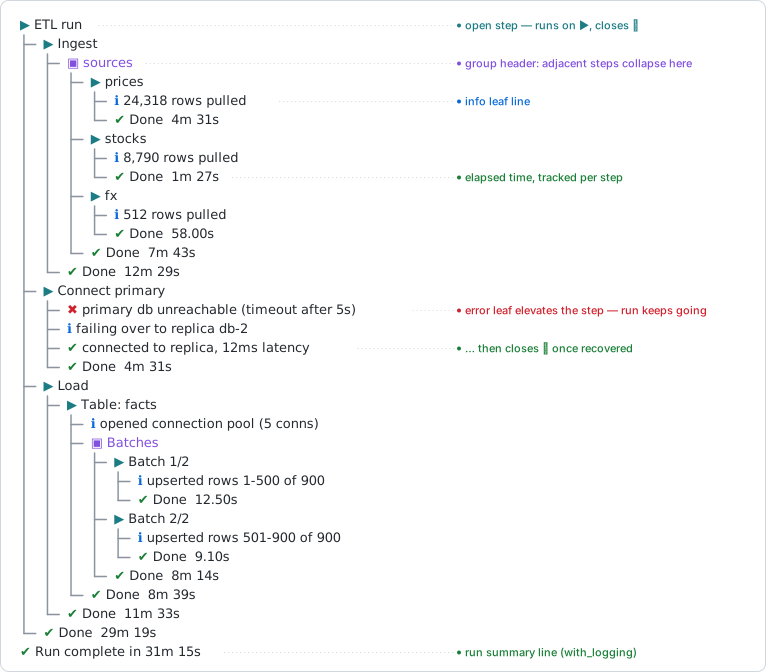
logtree renders nested process execution as a live, colored tree in the console – tree connectors, status glyphs, and elapsed time per step – and keeps nesting depth correct even when a step errors partway through.
A step is opened by the function that does the work, and closes itself when that function’s frame exits: normally, by an early return(), or because an error unwound through it. Nothing has to be balanced by hand, so the indentation can never drift out of sync with what is actually running.
Installation
install.packages("logtree")

# or the development version
# install.packages("pak")
pak::pak("IvanSortino/logtree")
Quick start
library(logtree)

load_config <- function() {
  log_step("Load config")
  log_info("reading config.yml")
  log_success("validated 12 parameters")
}

fetch_rows <- function() {
  log_step("Fetch rows")
  log_info("requesting from API")
  log_warn("rate limit at 80%")
  log_success("fetched 1,204 rows")
}

pipeline <- function() {
  log_step("Nightly pipeline")
  load_config()
  fetch_rows()
}

with_logging(pipeline())
#> ▶ Nightly pipeline
#> ├─ ▶ Load config
#> │  ├─ ℹ reading config.yml
#> │  ├─ ✔ validated 12 parameters
#> │  └─ ✔ Done  0.00s
#> ├─ ▶ Fetch rows
#> │  ├─ ℹ requesting from API
#> │  ├─ ⚠ rate limit at 80%
#> │  ├─ ✔ fetched 1,204 rows
#> │  └─ ⚠ Done  0.00s
#> └─ ✔ Done  0.00s
#> ✔ Run complete in 0.00s
logtree_summary()
#>
#> ── Summary: 1 warning ──────────────────────────────────────────────────────────
#> ⚠ Nightly pipeline › Fetch rows › rate limit at 80%
Three things happened without being asked for. fetch_rows() nested one level under pipeline(), because it was called from inside it – neither function passed the other a depth. The log_warn() line turned its own step’s close glyph yellow, without throwing anything. And logtree_summary() replayed that warning with the path it happened on, so a run long enough to scroll does not have to be scrolled back through.
Features
Every feature has a section in the guide and a reference page.
| Feature | What it does | Guide | Reference |
|---|---|---|---|
| Self-closing steps | A step closes when the function that opened it returns – normally, early, or on an error | Steps | log_step() |
| Leaf levels | Five message levels under the current step | Leaf lines | log_info() |
| Status elevation | A warning or error bumps its enclosing step’s glyph without throwing | Status elevation | log_warn() |
| Error handling | An uncaught error marks every open step and is logged, then rethrown | Uncaught errors | with_logging() |
| Routed R conditions |
warning() and message() become leaves in the tree instead of stderr noise |
Routing R conditions | with_logging() |
| Manual control | Open and close steps by hand, for top-level scripts and block structure | Manual step control | log_open() |
| Grouping | Adjacent steps sharing a value collapse under one header | Grouping | log_step() |
| Verbosity | A minimum level to render, globally or per sink | Verbosity | logtree_threshold() |
| Run digest | Every error, warning and pinned line since the last reset, with breadcrumbs | The run digest | logtree_summary() |
| Call sites | Annotate lines with file.R:line fn(), as a clickable link |
Call sites | logtree_theme() |
| Timestamps | A fixed-width wall-clock column in front of every line | Timestamps | logtree_theme() |
| Themes | Five presets – unicode, ascii, emoji, minimal, ci – and every slot overridable | Themes | logtree_theme() |
| Layout | Wrapping, indentation density, and the two glyph gaps | Layout and density | logtree_theme() |
| File sinks | Mirror the run to a plain-text or NDJSON file | Output sinks | logtree_sink_file() |
| Custom sinks | Register any function of one event; list and remove them | Output sinks | logtree_sink() |
| Memory sink | Collect events in a buffer and read them back as a data frame | Testing your logging | logtree_sink_memory() |
| Mute | Silence every sink at once without unregistering any | Silence | logtree_mute() |
logger bridge |
Route an existing logger codebase through logtree in one call |
logger integration | logtree_logger() |
Where to go next
- Get started – the full guide, one section per feature, each with a runnable example and its output.
- Examples – complete end-to-end runs: a nightly ETL, a migration that fails, a CI build log, asserting on your logging in tests.
- Themes cookbook – every theme slot and field, the five presets side by side, and recipes for building your own.
-
Recipes – top-level scripts, library authors, scheduled jobs, and the
loggerbridge. - Reference – all 23 exported functions.
- Design philosophy – why depth is tied to frames and why the corner connector only ever appears on a close line.